

Sending invoices shouldn't eat your evening. Yet for many freelancers and small business owners, that's exactly what happens — you open a blank document, second-guess the math, and wonder whether it looks professional enough to actually get paid.
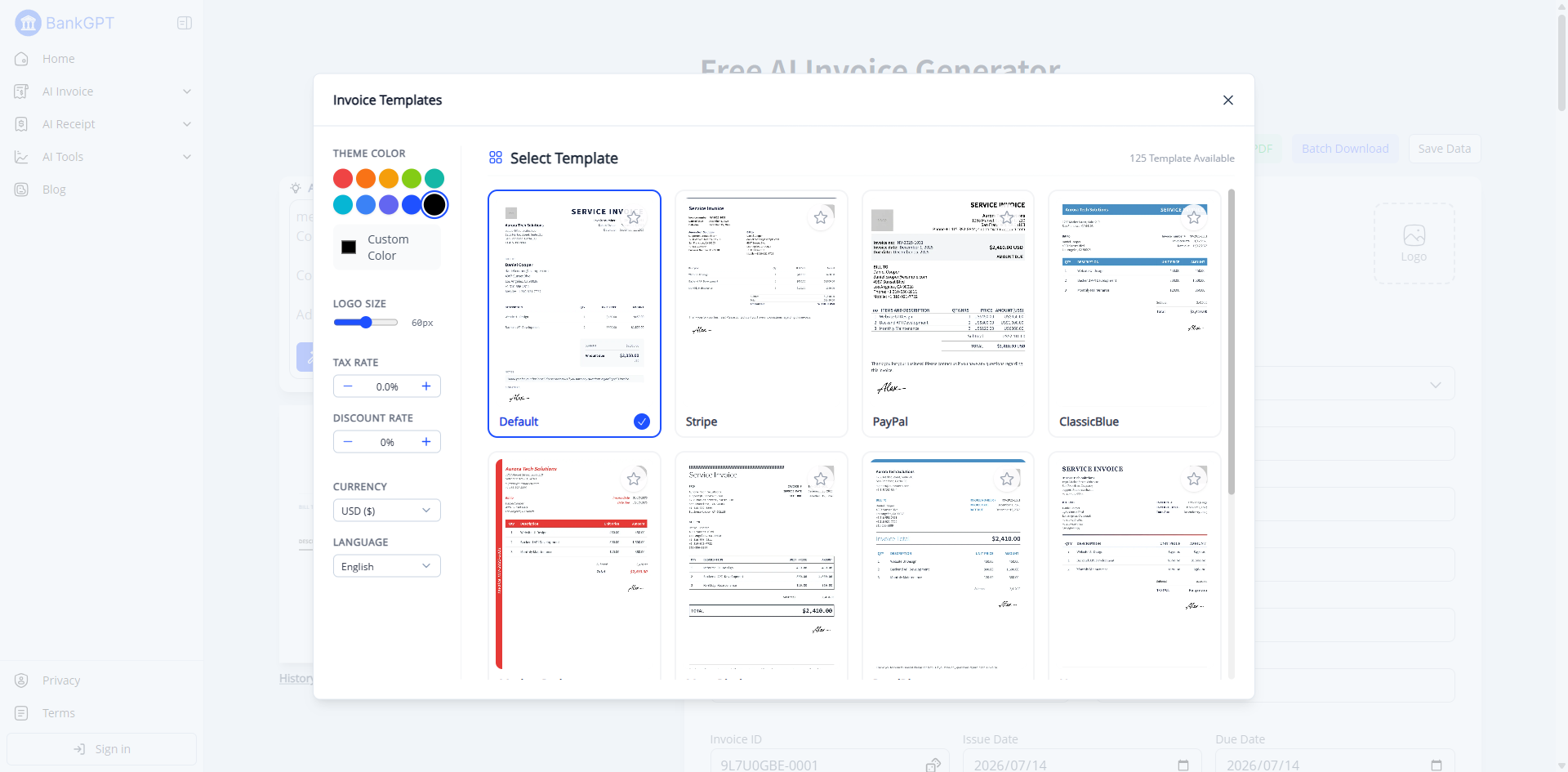
That's where free invoice templates for small business come in. Pick one of 100+ ready-made online templates, customize it with your brand, and have a polished, printable invoice ready in minutes. Your data stays on your device — nothing gets uploaded — and every template exports to a clean PDF your clients will actually pay.
This guide covers what every compliant invoice must include, how to choose the right template, and how an AI invoice generator can take you from "filling out a template" to "done in seconds."
Why Your Small Business Needs a Professional Invoice Template
An invoice is more than a request for payment. It's a piece of your brand, a legal record, and a signal of how seriously you run your business. A clean, complete invoice does three things a messy one can't:
- Builds trust. Clients associate a polished invoice with a reliable vendor. A sloppy one raises quiet doubts about the rest of your work.
- Gets you paid faster. Incomplete invoices give clients an excuse to delay. A complete one removes every administrative reason to wait.
- Protects you at tax time. The IRS expects business records to establish who paid, who was paid, how much, when, and for what.
The cost of a bad invoice is real: delayed payments, disputed charges, and, in an audit, documentation the IRS may refuse to accept. Free invoice templates give every small business a credible starting point without design skills or software cost.
What Every Small Business Invoice Must Include
There's no single federal law dictating invoice format in the US, but IRS record-keeping rules effectively define what a compliant invoice must contain. The IRS requires business records — invoices included — to identify:
- The payer and payee — who paid and who received payment
- The amount — the dollar value of the transaction
- The date — when the transaction occurred
- The business purpose — what goods or services were provided
Based on those rules, a compliant small business invoice should include:
| Field | Required? |
|---|---|
| Your business name | Required (IRS) |
| Client's name | Required (IRS) |
| Invoice date & date of service | Required (IRS) |
| Description of goods or services | Required (IRS) |
| Amount charged & total due | Required (IRS) |
| Tax rate & tax amount (separate line) | Required if collecting sales tax |
| Invoice number | Strongly recommended |
| Payment due date & instructions | Strongly recommended |
Never embed sales tax into your price — it must appear as a separate line item so the buyer can verify it. And you don't need an EIN on client invoices; sole proprietors using their SSN should never put it on one. Free invoice templates that follow IRS rules remove the guesswork from compliance, so you start from a structure that already meets the bar.
Every template below covers these fields. If you want the math and compliance handled automatically, BankGPT's AI invoice generator fills all required fields, calculates tax lines, and processes your data locally — nothing gets uploaded.
Free PDF Invoice Templates by Business Type
All 100+ free invoice templates for small business are fully editable, printable, and export to PDF. Match the template to what you sell:
- Service invoice template — for businesses billing time and expertise (consultants, designers, trades). Free invoice templates for services highlight labor hours and rates.
- Freelancer invoice template — built for juggling multiple clients, with project descriptions and reimbursable expenses. Freelancers save the most from ready-made free invoice templates.
- Sales / retail invoice template — for product-based businesses, with quantities, unit prices, and subtotals.
- Proforma invoice template — sent before work begins as a cost estimate, to set scope and price expectations.
These free invoice templates share the same compliant fields; only the layout changes per business type, so switching is painless as you grow.
Static Template vs. AI Invoice Generator
Free invoice templates get you most of the way there, but every invoice still means manual entry and manual math. As your volume grows, that adds up.
| Task | Static PDF Template | AI Generator (BankGPT) |
|---|---|---|
| Layout & data entry | Manual | Automatic |
| Calculate totals, tax, discounts | Manual | Automatic |
| Customize theme & logo | Manual per invoice | Apply once, reuse |
| Catch missing required fields | You remember | Built-in |
| Export & print PDF | Manual | One click |
| Data privacy | Local file | Local, never uploaded |
| Extract data from received invoices | Not possible | Automatic |
A template is a great starting point, especially when you're new or low-volume. Starting from free invoice templates, BankGPT then automates the rest — generation, calculation, and export — so the busywork disappears. An AI generator is the better tool once speed and accuracy start to matter, and it costs nothing to try.
How BankGPT AI Automates Creation, Extraction & Customization
BankGPT turns raw billing details into clean, professional invoices in seconds. The free AI invoice generator handles three jobs:
- Creation. Enter your client info, line items, prices, and tax. Click generate. BankGPT builds a compliant invoice instantly, with totals and discounts calculated for you — no manual math.
- Customization. Pick from 100+ templates, apply your logo and brand theme once, and every invoice after carries a consistent, professional look. Every template is editable, printable, and exports to PDF.
- Extraction. Beyond creating invoices, BankGPT's AI platform extracts structured data from the invoices, receipts, and bank statements you receive, so accounting teams can automate data entry and reconciliation.
Your data stays on your device. Unlike most online invoicing tools, BankGPT processes your data locally and exports files directly to your computer. Your client and financial information is never uploaded — a strong fit for businesses handling sensitive data or anyone who prefers to keep their books offline.
How it works: Add your details → Generate → Download PDF or print. It's free, compatible with Stripe, PayPal, and Amazon, and built for freelancers, small businesses, and e-commerce sellers.

How to Fill Out an Invoice (Step by Step)
- Add your business name and contact info at the top.
- Add the client's name and contact info under "Bill To."
- Assign a unique invoice number (e.g., INV-001).
- Set the issue date and due date.
- List each product or service with description, quantity, and unit price.
- Calculate the subtotal, apply tax, and show the total due.
- Add payment instructions and send.
With BankGPT, steps 3 and 6 are handled for you — skip straight to download. Free invoice templates already include the right fields, so you mostly fill in the blanks rather than design from zero.
Frequently Asked Questions
What should a small business invoice include?
Your business name, client's name, invoice date, date of service, description of goods or services, amount charged, and total due. The IRS requires records to identify the payer, payee, amount, date, and business purpose. Add an invoice number, due date, and payment instructions.
Is there a standard invoice format for small businesses?
No federally mandated format exists in the US. The IRS doesn't prescribe a template; it requires that invoices document who paid, who was paid, the amount, the date, and the business purpose. What matters is the information, not the arrangement.
Are free invoice templates legally valid?
Yes — as long as they contain the required tax documentation: payer and payee, amount, date, and description of goods or services. If you collect sales tax, the rate and amount must appear as a separate line item.
Do I need an EIN on my invoice?
No. There's no federal requirement to include an EIN on client-facing invoices. Sole proprietors using their SSN should never put it on an invoice.
Can I customize a PDF invoice template with my logo?
Yes. BankGPT's PDF templates are fully editable — add your logo, brand colors, and theme. Apply your styling once and reuse it across all 100+ templates.
Is my invoice data safe — does it get uploaded?
Your data stays on your device. BankGPT processes your information locally and exports files directly to your computer, so your client and financial data is never uploaded. Edit, print, and export to PDF without data leaving your device.
How does an AI invoice generator work?
An AI generator takes your billing details and line items and builds a polished invoice automatically, calculating totals, taxes, and discounts. BankGPT creates a ready-to-send PDF in seconds.
Is BankGPT's AI invoice generator free to use?
Yes. BankGPT's AI invoice generator is free, so freelancers and small businesses can create professional invoices without subscriptions or overhead.
Start Sending Professional Invoices Today
You don't need expensive software to send invoices that get paid on time. Start with one of 100+ free invoice templates for small business, customize the theme to match your brand, and make sure it covers every required field. Every template is editable, printable, and exports to PDF — and your data stays on your device.
When you're ready to stop filling out templates by hand, try BankGPT's free AI invoice generator. It creates, calculates, and customizes invoices in seconds, processes data locally, and exports a clean, printable PDF your clients will actually pay.
Sources: Invoice legal requirements referenced from IRS record-keeping rules and US state sales tax guidance.