
For accounting firms, bookkeepers, and finance teams, converting bank statements into usable accounting data is one of the most repetitive and error-prone tasks in the monthly close. A typical client may send a 5 to 10 page PDF statement every month, often in a bank-specific layout, scanned format, or local language. Manually copying transactions into Excel or Xero wastes hours, introduces reconciliation errors, and makes multi-client reporting unnecessarily difficult.
This is where a modern bank statement to excel tool changes the workflow. Instead of splitting PDFs, rebuilding tables, or re-entering transactions, BankGPT lets users upload statements, parse them online in real time, review the extracted data, and export it to Excel, CSV, JSON, QBO, OFX, and other accounting-ready formats.
In this comparison, we put BankGPT against three leading alternatives, namely DocuClipper, Hubdoc, and MoneyThumb, and explain why BankGPT is especially valuable for accounting firms that need batch processing, repeatable exports, multilingual statement support, and a reliable bank statement to excel tool for Xero and other platforms.
Why Accountants Need a Reliable Bank Statement to Excel Tool
Accountants rarely convert one statement at a time. They process statements for dozens or hundreds of clients, across multiple banks, currencies, languages, and accounting platforms. The real requirement is not simply PDF to CSV. It is a dependable workflow that can:
- Accept multi-page bank statements without forcing users to split files.
- Preserve transaction order, dates, descriptions, debits, credits, and running balances.
- Support batch uploads for multiple clients and banks.
- Export the same parsed result into different formats without uploading the file again.
- Provide an online preview so users can validate data before importing it into Xero, QuickBooks, or an internal platform.
- Handle statements in different languages and regional bank formats.
A capable bank statement to excel tool should therefore act as a financial data workspace, not merely a one-click converter. This is the central difference between BankGPT and many traditional converters.
The Real Problem: Multi-Page Statements and Xero Imports
Consider a common request from an Australian accounting firm:
"We often have to convert PDF bank statements to CSV files to import into Xero. I tested a bank converter with a typical monthly statement and it could not read the page count. The file was only 643 KB but it was 10 pages. Is there a page limit per file? Our typical bank statement is 5 to 10 pages per month."
This is a practical, high-value problem. Many tools handle short statements well but struggle when a PDF contains multiple pages, continued tables, page headers, repeated column names, or a running balance that continues across pages.
BankGPT is designed for this scenario. Its converter treats a multi-page statement as one continuous document, tracks tables across pages, and preserves the running balance throughout the statement period. Users can upload a 10-page statement as a single file and export the entire period as one continuous, reconciliation-ready table.
For an accountant preparing a Xero import, this matters because splitting a statement can create duplicate opening balances, missing transactions, or broken running-balance logic. A strong bank statement to excel tool should eliminate that manual splitting step whenever possible.

What Makes BankGPT Different from Other Bank Statement Converters
BankGPT is more than a basic PDF to Excel converter. It combines real-time online parsing, batch processing, structured output, preview and validation, and repeatable exports in one browser-based workflow.
1. Online Real-Time Parsing
BankGPT parses statements directly in the browser-based workflow. Users upload a PDF, image, or supported file, and the platform extracts transaction-level data in seconds. There is no software installation, no template setup, and no need to wait for a manual review process before seeing the initial result.
This real-time approach is particularly useful for accounting teams that need to turn around client work quickly. A firm can upload a statement, inspect the extracted rows, correct any exceptions if needed, and export the final file during the same working session.
2. Batch Processing and Batch Saving
BankGPT supports batch uploads of up to 20 files, with individual files up to 20 MB and ZIP uploads up to 50 MB. Users can process PDFs, CSVs, and images together, then export results individually or combine them into a single ledger.
For an accounting firm, this means a monthly client batch can be handled as one workflow:
- Collect statements from multiple clients.
- Upload them in one batch.
- Parse and review the extracted transactions.
- Save or export each client file separately.
- Merge selected results into a consolidated Excel workbook when required.
This batch-first design makes BankGPT a practical bank statement to excel tool for firms rather than only for individual users.
3. Multi-Page Statement Support
BankGPT explicitly supports multi-page statements. Instead of treating each PDF page as an isolated table, it follows the statement structure across pages and maintains the running balance from the first to the final transaction.
That is important for monthly statements of 5 to 10 pages, quarterly statements, and longer business account statements. The user does not need to split the document into smaller files simply because the converter cannot handle page continuity.
4. Multiple Output Formats Without Re-Uploading
After parsing, BankGPT lets users export the same result into Excel, CSV, JSON, QBO, OFX, and other formats. The column names remain consistent across formats, which reduces mapping work when moving between internal systems, client deliverables, and accounting software imports.
For example, one parsed statement can be used for:
- Excel: client review, management reporting, and reconciliation.
- CSV: Xero, QuickBooks, Sage, or custom platform import.
- JSON: automation scripts, APIs, data warehouses, or proprietary accounting systems.
- QBO and OFX: accounting software workflows that require those formats.
This parse once, export many times capability is a major advantage over tools that require users to re-upload the same document whenever they need another output format.
5. Markdown, JSON, and Excel Views
BankGPT provides multiple structured views, including Markdown, JSON, and Excel-style table views. This gives users flexibility beyond a standard spreadsheet export.
- Markdown view is useful for documentation, audit notes, internal reporting, and AI-ready structured content.
- JSON view is ideal for developers and teams building integrations with internal platforms.
- Excel view is ideal for finance teams, accountants, and clients who prefer a familiar spreadsheet interface.
Because the same parsed dataset can be viewed in different formats, BankGPT functions as both a bank statement to excel tool and a structured financial-data extraction platform.
6. Online Preview and Format Comparison
Before downloading, users can preview the extracted table and check dates, descriptions, amounts, and balances. This reduces the risk of importing incomplete or misaligned data into Xero or another accounting platform.
The online preview also allows teams to compare the original statement structure with the parsed output. Instead of discovering an issue after a failed import, users can validate the result first, make corrections where necessary, and then download the final file.
7. Merge Excel for Consolidated Reporting
BankGPT includes a Merge Excel capability that allows users to combine parsed statements into a second, consolidated Excel download. This is valuable for:
- Combining several monthly statements for one client.
- Consolidating multiple bank accounts into one workbook.
- Creating a single ledger for a quarter or financial year.
- Preparing management reports across multiple clients or entities.
For accounting firms, this turns individual conversions into a complete reporting workflow. A firm can convert statements, save the individual outputs, and then merge selected files into one Excel deliverable.
8. Multilingual Statement Support
BankGPT supports statements in multiple languages and local bank formats. This is essential for firms serving international clients, expatriates, cross-border businesses, or companies operating in non-English markets.
Instead of relying on English-only templates, BankGPT parsing approach is designed to recognize transaction structures across different local-language bank statement PDFs. That makes it a stronger bank statement to excel tool for global accounting practices.
9. Accuracy and Efficiency Gains
BankGPT is positioned as a high-accuracy extraction platform, with the goal of delivering complete, structured transaction data and reducing manual data entry. In practical terms, the value comes from three areas: automated extraction, online validation, and consistent output fields.
For teams currently entering transactions manually, the efficiency improvement can be substantial. BankGPT positions its workflow as delivering up to 90 percent efficiency improvement by removing repetitive copying, table rebuilding, and manual formatting.
That said, no financial-data tool should replace professional review entirely. The best practice is to use automated extraction for speed, then use BankGPT preview and balance checks to validate the final result before import.
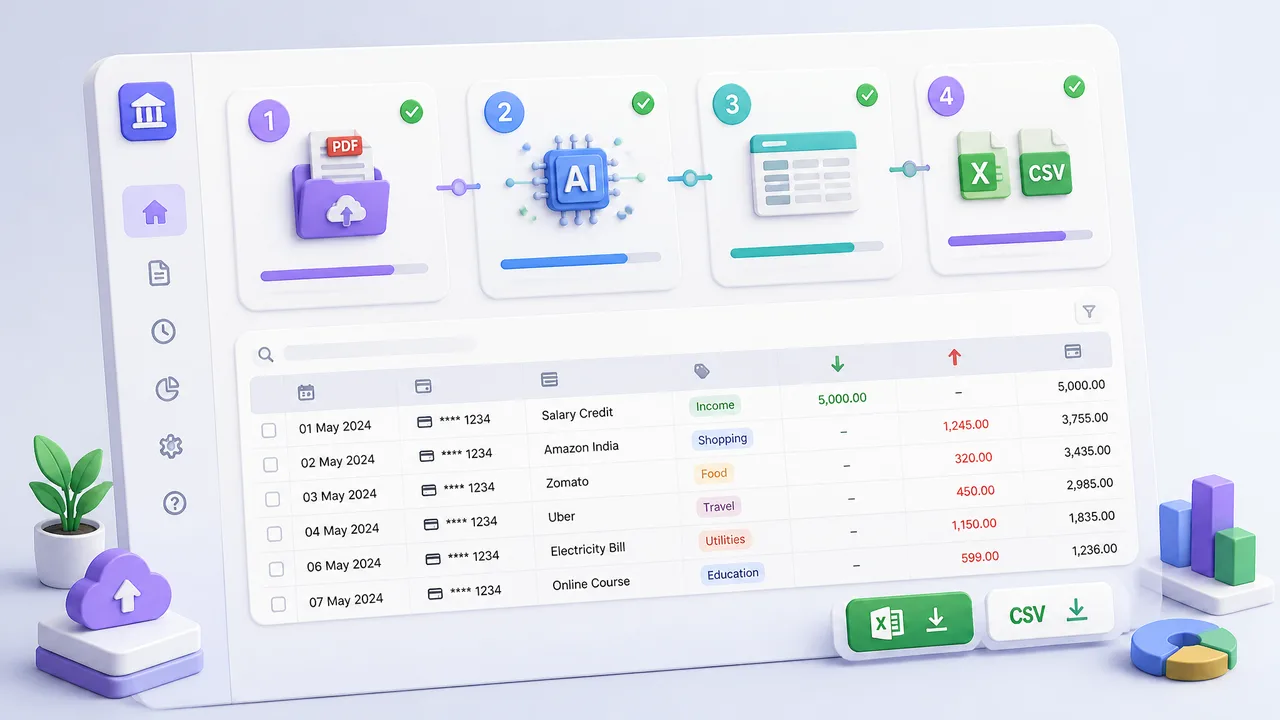
How to Convert a Bank Statement to Excel with BankGPT: Step by Step
For an accountant preparing a Xero import, the most important requirement is simple: convert a 10-page monthly PDF bank statement into a clean CSV for Xero without splitting the file.
A practical Xero workflow with BankGPT looks like this:
- Upload the client 5 to 10 page monthly bank statement.
- Let BankGPT parse the transactions in real time.
- Review the online preview, including dates, descriptions, amounts, and balances.
- Export a CSV for Xero import.
- Export an Excel version for client review or internal archiving.
- Export JSON if the firm needs to load the data into its own platform.
- Merge monthly statements into one Excel workbook for quarterly or annual reporting.
This workflow turns a fragmented conversion task into a controlled, repeatable process.
BankGPT vs. DocuClipper, Hubdoc, and MoneyThumb
DocuClipper, Hubdoc, and MoneyThumb are widely recognized options in the bank-statement conversion market. Each has strengths, but their workflows differ from BankGPT batch-first, multi-format, preview-driven approach.
| Capability | BankGPT | DocuClipper | Hubdoc | MoneyThumb |
|---|---|---|---|---|
| Multi-page statement handling | Strong, follows tables and running balance across pages | Strong for financial documents, but page allowances are plan-based | Suitable for standard documents, though complex statements may need correction | Supports multiple formats, but compatibility varies by bank and software |
| Batch processing | Up to 20 files per batch, PDF, CSV, and image support | Supports high-volume document processing | More focused on document collection than batch conversion | Batch capabilities are less central to the product experience |
| Excel, CSV, JSON, QBO, OFX | Yes, same parsed result can be exported in multiple formats | CSV, Excel, and customizable fields | Primarily Xero and QuickBooks document workflows | CSV, QBO, QFX, and related formats |
| Online preview before export | Yes, users can review transactions and balances before download | Structured output is available, but preview workflow is less central | Focuses on document management and syncing | Focuses on conversion output |
| Markdown and JSON views | Yes, useful for internal systems and automation | Limited emphasis in public positioning | Not a core feature | Not a core feature |
| Merge Excel download | Yes, users can merge parsed statements into a consolidated Excel file | Not emphasized as a core workflow | Not emphasized | Not emphasized |
| Multilingual statements | Supports multiple languages and local bank formats | Supports many banks, with emphasis on US and international statements | Broad document capture, but language coverage is less central | Varies by bank and template support |
| No-sign-up core workflow | Yes, browser-based, no installation required | Subscription-based | Subscription-based, from 12 USD per month | Often purchase-based or quote-based |
DocuClipper: Strong OCR, Less Flexible Export Workflow
DocuClipper is a well-established OCR and financial-document extraction platform. It handles bank statements, credit-card statements, brokerage statements, invoices, and receipts, and it supports batch processing for high-volume bookkeeping work.
Its strengths include broad bank coverage, OCR support for scanned and digital PDFs, and customizable output fields. For firms that mainly need PDF to CSV conversion at scale, DocuClipper is a credible option.
However, its entry plan starts at 39 USD per month for 120 pages, direct integrations are limited, and there is no mobile app. Compared with BankGPT, DocuClipper is less focused on giving users one parsed result that can be repeatedly exported as Excel, CSV, JSON, Markdown, QBO, or OFX.
BankGPT is therefore better suited to teams that need a flexible bank statement to excel tool with structured data views, online validation, and multi-format exports in the same workflow.
Hubdoc: Good for Document Collection, Not Conversion-First Workflows
Hubdoc is part of the Xero and QuickBooks ecosystem. It helps firms collect bills, receipts, and statements from email, mobile capture, banks, and other sources, then sync documents into their accounting platform.
For businesses already embedded in Xero, Hubdoc can be convenient for document collection and basic data capture. Its starting price is 12 USD per month, making it accessible for smaller practices.
The limitation is that Hubdoc is primarily a document-management and capture platform, not a conversion-first bank statement to excel tool. Users with complex statements, non-standard layouts, scanned documents, or multi-page tables may still need manual correction.
BankGPT, by contrast, is built around transaction extraction, preview, structured export, batch handling, and consolidated Excel output. That makes it more suitable when the main goal is to turn statements into clean, import-ready data.
MoneyThumb: Useful Formats, Less Modern Workflow
MoneyThumb offers conversion software for PDF bank statements into formats such as CSV, QBO, and QFX. It can be useful for users who specifically need traditional accounting-software import formats.
Its weaknesses include limited pricing transparency for some products, compatibility issues depending on the bank and accounting software, and a less modern, browser-first workflow.
BankGPT provides a more complete online experience: upload, parse, preview, export, save, and merge without installing desktop software. For firms that want a repeatable monthly process, this reduces operational friction.

Who Should Use BankGPT for Bank Statement Conversion
BankGPT is especially valuable for:
- Accounting firms processing statements for many clients each month.
- Bookkeepers preparing Xero, QuickBooks, or Sage imports.
- Finance teams consolidating multiple bank accounts.
- Outsourced accounting providers serving clients in different countries and languages.
- Developers and SaaS teams that need JSON output for internal platforms.
- Businesses that want to convert statements without installing desktop software.
If a team only needs one occasional PDF to CSV conversion, a basic converter may be enough. But if the team needs a dependable bank statement to excel tool for recurring client work, batch uploads, multi-format exports, and consolidated reporting, BankGPT offers a more complete workflow.
How to Evaluate Any Bank Statement Converter
Before choosing a converter, test it with real client files rather than sample statements. Use this checklist:
- Can it process a 10-page statement without splitting?
- Does it preserve the running balance across pages?
- Can it handle scanned PDFs as well as digital PDFs?
- Does it support the languages and bank formats your clients use?
- Can you preview the extracted rows before downloading?
- Can you export the same result to Excel, CSV, JSON, QBO, and OFX?
- Can you batch-upload multiple statements?
- Can you save and reuse the parsed result?
- Can you merge multiple Excel outputs into one consolidated workbook?
- Does the output import cleanly into Xero without manual column mapping?
BankGPT performs strongly across these criteria because its workflow is designed around real accounting operations rather than a single conversion action.
Frequently Asked Questions
What is the best bank statement to Excel tool for accountants in 2026?
For accounting firms that handle multi-page statements, batch client work, and exports to Xero or QuickBooks, BankGPT stands out because it combines real-time online parsing, multi-page support, batch uploads, structured Markdown, JSON, and Excel views, plus Merge Excel for consolidated reporting.
Can BankGPT handle 10-page monthly PDF statements without splitting?
Yes. BankGPT treats a multi-page statement as one continuous document, tracks tables across pages, and preserves the running balance throughout the statement period, which removes the manual splitting step that other converters often require.
Does BankGPT export directly to Xero and QuickBooks?
BankGPT exports the same parsed result to Excel, CSV, JSON, QBO, and OFX. CSV works for Xero and QuickBooks bank statement imports, while QBO and OFX cover workflows that need those formats natively.
How many statements can BankGPT process in one batch?
BankGPT supports batch uploads of up to 20 files, with individual files up to 20 MB and ZIP uploads up to 50 MB. This is enough for most monthly client batches at an accounting practice.
Does BankGPT support non-English bank statements?
Yes. BankGPT supports multiple languages and local bank formats, which is useful for firms serving international clients, expatriates, cross-border businesses, or companies operating in non-English markets.
Final Verdict
DocuClipper, Hubdoc, and MoneyThumb each serve useful parts of the bank-statement conversion market. DocuClipper is strong for OCR-driven financial document extraction, Hubdoc is useful for Xero-centered document collection, and MoneyThumb serves users that need traditional import formats.
But for accounting firms that need to process multi-page statements, batch-upload client files, validate results online, export to multiple formats, and consolidate Excel outputs, BankGPT is the more complete solution. Its real-time parsing, multilingual support, batch saving, structured Markdown, JSON, and Excel views, plus Merge Excel capability, make it a practical bank statement to excel tool for modern accounting teams.
For firms that regularly convert 5 to 10 page statements for Xero, the fastest way to evaluate BankGPT is to upload a real monthly statement, review the parsed preview, and export both CSV and Excel versions. If the balances reconcile and the transactions import cleanly, the tool can immediately remove one of the most repetitive bottlenecks in the monthly accounting workflow.
Try the bank statement to excel tool from BankGPT to convert multi-page statements, batch-process client files, and export reconciliation-ready Excel, CSV, and JSON data.